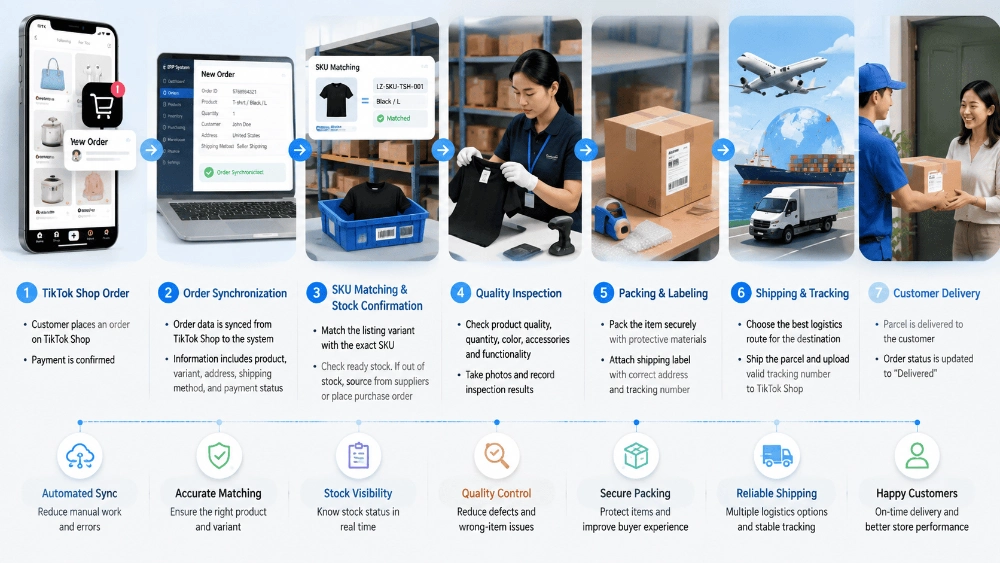
Ein TikTok-Shop-Verkauf kann nur wenige Minuten nach dem Erreichen der Reichweite eines Videos stattfinden. Die Abwicklung beginnt sofort. Die Produktvariante muss verknüpft, der Lagerbestand bestätigt, die Zahlung abgeglichen, der Artikel geprüft und eine gültige Sendungsverfolgungsnummer zugewiesen sein, bevor die Übergabe an den Versanddienstleister erfolgt.
Für Verkäufer, die TikTok Shop Dropshipping nutzen, liegt der größte Engpass in der Übergabe zwischen Shop, Beschaffungsteam, Lager und Logistikdienstleister. Manuelle Übergabe, fehlerhafte Artikelnummernzuordnung, verzögerte Lagerbestätigung und uneinheitliche Verpackung können eine erfolgreiche Kampagne in Stornierungen oder Rückerstattungen verwandeln. Dieser Artikel beschreibt den Auftragsabwicklungsprozess von TikTok Shop von der Synchronisierung bis zur Auslieferung und konzentriert sich dabei auf Auftragsannahme, Lagerentscheidungen, Qualitätskontrollen, Retourenverfolgung und Ausnahmefälle.
Was passiert, wenn eine Bestellung im System eingeht?
Sobald die Zahlung bestätigt ist, muss der Bestellprozess vom Shop zum Versandteam kontrolliert ablaufen. Das System muss Kundenadresse, Menge, Variante, Versandart, Produktkosten und Lagerstatus korrekt erfassen. Fehlende oder fehlerhafte Daten können sich auf Einkauf, Kommissionierung, Verpackung oder Lieferung auswirken.
Die Auftragssynchronisierung erstellt den ersten Datensatz
Die Auftragssynchronisierung überträgt Shopdaten automatisch und ohne wiederholte manuelle Eingabe in das Fulfillment-System. Der importierte Datensatz sollte Bestellnummer, Produkt, Menge, Variante, Kunde und Lieferadresse enthalten. Einkauf, Lager, Finanzabteilung, Sendungsverfolgung und Kundenservice verwenden dann dieselbe Referenz.
Testen Sie die Verbindung, bevor der Kampagnen-Traffic steigt. Testbestellungen können fehlerhafte Varianten, abgelehnte Adressformate und fehlgeschlagene Stornierungs- oder Rückerstattungsaktualisierungen aufdecken. Der Systemdatensatz muss die Shop-Bestellung widerspiegeln.
Die SKU-Zuordnung verbindet das Angebot mit dem Produkt.
Für die Lagerverwaltung reicht ein Artikeltitel nicht aus. Jede Variante muss einer exakten Lieferanten- oder Lagerartikelnummer (SKU) zugeordnet sein. Farbe, Größe, Modell, Steckertyp, Verpackungseinheit und mitgeliefertes Zubehör erfordern möglicherweise separate Zuordnungen.
Fehlerhafte Zuordnungen führen zu falschen Artikellieferungen, selbst wenn die Bestelldaten korrekt übertragen werden. Prüfen Sie jede Zuordnung anhand des genehmigten Musters und des Lageretiketts und überprüfen Sie sie erneut nach jeder Änderung des Lieferanten, der Variante oder des Bundles.
Wie die Ein-Klick-Bestellung eine Bestellung in den Kaufprozess überführt
Nach Bestätigung von Bestellung und Artikelnummer muss das System anzeigen, ob das Produkt auf Lager ist, bestellt werden muss und ob ausreichend Bestand vorhanden ist. Dadurch werden kommissionsbereite Bestellungen von solchen getrennt, die auf die Bearbeitung durch den Lieferanten oder das Lager warten.
Zahlungs- und Kontostandsprüfung beugt Verzögerungen vor.
Die Ein-Klick-Bestellung reduziert den Aufwand für wiederholte Bestellungen, ist aber weiterhin von einem Zahlungsnachweis abhängig. Das Bestellsystem sollte Shop-Bestellung, Produktkosten, verfügbaren Saldo und Lageraufgabe verknüpfen. Bestellungen, die auf Zahlung warten, sollten sichtbar bleiben und nicht als versandbereit angezeigt werden.
Zentralisierte Bestandsinformationen sind wichtig, wenn mehrere Kampagnen gleichzeitig laufen. Verkäufer sollten einen Nachschubplan festlegen, der auf dem täglichen Bestellwert und den Kampagnenplänen basiert.
LZ's Ein-Klick-Bestellservice Unterstützt die Einreichung von Produktlinks, die Auftragsabwicklung, den Wareneingang im Lager, die Qualitätskontrolle und die Versandvorbereitung innerhalb eines einzigen Arbeitsablaufs.
Bestellungen, die ab Lager verfügbar sind, und Bestellungen, die erst beschafft werden müssen, benötigen unterschiedliche Wege.
Bestellungen von Lagerware können von der Bestätigung in die Kommissionierung und Qualitätskontrolle übergehen. Bestellungen, die eine Beschaffung erfordern, benötigen Lieferantenbestätigung, Angebotsgenehmigung, Einkauf, Inlandsversand, Wareneingang im Lager und Qualitätskontrollen vor dem internationalen Versand.
Bei der Auftragsabwicklung im Dropshipping sollte diese Unterscheidung frühzeitig erfolgen. Sie zeigt, welche Bestellungen innerhalb des geplanten Versandzeitraums versendet werden können und bei welchen gegebenenfalls eine Kontaktaufnahme mit dem Kunden erforderlich ist. Auch der Lagerbestand muss noch überprüft werden, da reservierte, beschädigte oder defekte Einheiten die nutzbare Menge reduzieren.
Für neue Produkte Produktbeschaffungsunterstützung Die Koordination von Lieferantenoptionen, Angeboten, Mustern und der Auftragsabwicklung ist möglich. Produktqualität, wiederkehrende Lieferungen, Verpackungskontrolle und Lieferzuverlässigkeit sollten wichtiger sein als das günstigste Angebot.
Wie das Lager jede Kundenbestellung vorbereitet
Sobald das Produkt verfügbar ist, wandelt das Lager den digitalen Datensatz in ein Paket um. Kommissionierung, Prüfung, Verpackung und Etikettierung müssen sich auf dieselbe Bestellung und Artikelnummer beziehen, da korrekte Systemdaten Mängel, fehlendes Zubehör oder mangelhafte Verpackung nicht verhindern können.
Kommissionierung und Qualitätskontrollen erfolgen gemäß der genehmigten Artikelnummer.
Der Kommissionierer sollte die interne Artikelnummer (SKU), den Barcode, das Produktbild oder den Lagerort verwenden, die mit der Bestellung verknüpft sind. Die Variantenbestätigung ist besonders wichtig, wenn Produkte ähnliche Verpackungen verwenden. Nach der Kommissionierung muss der Artikel die für seine Kategorie definierten Prüfpunkte passieren.
Bei einfachen Zubehörteilen müssen unter Umständen Menge, Farbe und Zustand geprüft werden. Elektronikartikel erfordern möglicherweise zusätzlich eine Bestätigung von Funktion, Stecker, Spannung und Zubehör. Kundenspezifische Produkte müssen auf Logo, Druckposition, Rechtschreibung und Verpackung geprüft werden. Fotos oder Mängelberichte können spätere Reklamationen bei falschen Artikeln, Beschädigungen oder fehlenden Teilen unterstützen.
Bei fehlgeschlagenen Prüfungen ist eine Entscheidung auf Auftragsebene erforderlich.
Eine fehlgeschlagene Qualitätsprüfung sollte nicht einfach als informeller Lagervermerk vermerkt bleiben. Der Auftrag benötigt einen sichtbaren Status und ein definiertes nächstes Vorgehen. Je nach Lagerbestand und Zeitpunkt kann das Lager den Artikel ersetzen, neue Ware anfordern, den Artikel zurücksenden oder den Auftrag zur Stornierung eskalieren.
Der Austausch eines beschädigten Geräts aus dem Lagerbestand kann schnell erfolgen, während das Warten auf eine neue Lieferung den Lieferzeitraum unrealistisch verlängern kann. Statusmeldungen wie „Austausch ausstehend“, „Bestätigung durch den Lieferanten“ oder „Stornierungsprüfung“ helfen dem Kundenservice, präzise zu reagieren.
Wie Verpackung und Sendungsverfolgung den gesamten Versand abwickeln
Die Ware darf die Qualitätskontrolle erst verlassen, nachdem das Lager Verpackung, Transportweg, Etikettierung und Sendungsverfolgung bestätigt hat. Eine zu frühe Etikettierung kann zu Lücken in der Sendungsverfolgung und Unsicherheiten bei der Übergabe durch den Spediteur führen.
Die einteilige Verpackung schützt die korrekte Bestellung
Bei der Einzelstück-Fulfillment-Methode wird jede Kundenbestellung separat kommissioniert, geprüft, verpackt und etikettiert. Produkt, Adresse und Sendungsverfolgungsnummer müssen während des gesamten Prozesses miteinander verbunden bleiben.
Die Verpackung muss dem Transportrisiko entsprechen. Zerbrechliche Güter benötigen inneren Schutz, Flüssigkeiten müssen auslaufsicher verpackt werden und mehrteilige Produkte benötigen eine Verpackung, die die Komponenten zusammenhält. Markeneinlagen oder kundenspezifische Verpackungen sollten nur nach Genehmigung und Artikelnummernverknüpfung verwendet werden.
Die Versandrichtlinien von TikTok Shop erfordern eine angemessene Verpackung und korrekte Versandinformationen. Der Verkäufer bleibt auch dann verantwortlich, wenn ein externer Lager- oder Logistikdienstleister die eigentliche Arbeit übernimmt.
Der Versand im TikTok Shop richtet sich nach den Produkt- und Bestimmungsbedingungen.
Ein umfassender Vergleich der Versandmodelle von TikTok gehört in einen eigenen Artikel. Für den Versand im TikTok Shop kommt es in der Praxis darauf an, ob die gewählte Route für Produkt und Zielort geeignet ist und gleichzeitig die Anforderungen an Kosten, Sendungsverfolgung und Zustellung erfüllt.
Das Versandteam sollte vor der Etikettenerstellung Gewicht, Abmessungen, Batterie- oder Flüssigkeitsinhalt, Zielort, voraussichtliche Lieferzeit und Sendungsverfolgungsqualität prüfen. Mehrere Logistikoptionen ermöglichen die Auswahl einer Route pro Bestellung, anstatt jedes Paket über einen einzigen Dienstleister laufen zu lassen.
Die Sendungsverfolgung muss zur richtigen Shop-Bestellung zurückgesendet werden.
Die Nachverfolgung von Rücksendungen schließt den Systemkreislauf. Spediteur, Service, Sendungsnummer und Übergabestatus müssen der Bestellung zugeordnet sein, die im Versandsystem eingegangen ist. Für den Versand durch Verkäufer nutzt TikTok Shop Daten von Drittanbietern, um Versand- und Zustellstatus zu überprüfen. Daher müssen die hochgeladenen Informationen mit dem tatsächlichen Pakettransport übereinstimmen.
Eine zu früh erstellte Sendungsnummer kann dazu führen, dass kein Scan beim Versanddienstleister angezeigt wird, während eine der falschen Bestellung zugeordnete Sendungsnummer ein schwerwiegenderes Problem darstellt. Prüfen Sie vor dem Hochladen die Paketbereitschaft und die Auswahl des Versanddienstleisters und überprüfen Sie anschließend verzögerte erste Scans und ungültige Sendungsverfolgungsereignisse.
Automatische Auftragsabwicklung Es ermöglicht die Verknüpfung von Filialsynchronisierung, Produktabgleich, Lagerbearbeitung, Versand und Sendungsverfolgung. Die Automatisierung reduziert wiederholte Übertragungsarbeiten, Ausnahmeaufträge erfordern jedoch weiterhin eine manuelle Prüfung.
Wie betriebliche Ausnahmen gehandhabt werden sollten
Ein stabiles Dropshipping-Auftragsabwicklungssystem rechnet mit Unterbrechungen. Warenengpässe, Zuordnungsfehler, fehlgeschlagene Prüfungen, Adressprobleme, Ablehnungen durch den Versanddienstleister, verzögerte Scans und Stornierungen erfordern in verschiedenen Phasen unterschiedliche Maßnahmen.
Ausnahmen erfordern klare Zuständigkeiten
Jeder Ausnahmefall sollte einen Verantwortlichen, einen Status und einen nächsten Prüfpunkt haben. Ein Warenengpass kann dem Beschaffungswesen zuzuordnen sein. Eine fehlerhafte Zuordnung kann eine Korrektur im Lager und im System erfordern. Eine fehlgeschlagene Inspektion kann einen Warenaustausch im Lager notwendig machen. Eine Ablehnung durch den Spediteur kann zur Überprüfung an die Logistik weitergeleitet werden.
Ohne Zuständigkeit kann eine Bestellung für mehrere Teams sichtbar bleiben, ohne dass eine Entscheidung getroffen wird. Ein dedizierter Kommunikationskanal ermöglicht es Verkäufer und Fulfillment-Partner, mit derselben Bestellnummer, denselben Nachweisen und demselben Status zu arbeiten.
Wiederkehrende Probleme sollten den Arbeitsablauf ändern.
Ausnahmedatensätze sind auch über eine einzelne Bestellung hinaus nützlich. Mehrere Fälle mit falschen Varianten können auf eine fehlerhafte Artikelnummernzuordnung hinweisen. Wiederholte Beschädigungen können darauf hindeuten, dass der Verpackungsstandards unzureichend sind. Verzögerte Scans können auf einen ungeeigneten Übergabeplan des Transportunternehmens hinweisen.
Überprüfen Sie wiederkehrende Probleme nach Produkt, Lieferant, Lagerstufe und Route. Das Ergebnis kann ein neuer Prüfpunkt, eine überarbeitete Verpackung, ein anderer Lieferant, eine aktualisierte Zuordnung oder eine andere Logistikoption sein.
Was Verkäufer vor der Skalierung von Bestellungen prüfen sollten
Eine Kampagne kann das Auftragsvolumen schneller steigern, als Lagerbestand, Bilanz, Lagerkapazität oder Transportabwicklung angepasst werden können. Die folgenden Prüfungen zeigen, ob der Auftragsabwicklungsprozess von TikTok Shop eine größere Auftragswelle bewältigen kann, ohne dass eine einzelne Person jedes Problem manuell beheben muss.
| Kontrollpunkt | Vor dem Skalieren prüfen |
| Bestellsynchronisierung | Aktualisierungen zu Testbestellungen, Stornierungen und Rückerstattungen |
| SKU-Zuordnung | Prüfen Sie jede Variante anhand der Lager-SKU. |
| Kontostand | Legen Sie eine Nachschubroutine für das Kampagnenvolumen fest. |
| Lagerbestand | Verwendbare Lagerbestände von reservierten oder defekten Einheiten trennen |
| Prüfstandard | Definieren Sie Prüfungen für jede Produktkategorie |
| Verpackungsmethode | Schutz- und Markenmaterialien genehmigen |
| Logistikroute | Produkt- und Zielannahme bestätigen |
| Sendungsverfolgung | Ordnen Sie jede Nummer der richtigen Shop-Bestellung zu. |
| Ausnahme im Besitz | Weisen Sie die Verantwortung für Beschaffung, Lager, Logistik oder Service zu. |
Die Skalierung sollte erst dann beginnen, wenn das System Fehler ohne ständiges Eingreifen erkennen und beheben kann.
Wie LZ Dropshipping den Workflow unterstützt
LZ Dropshipping Das System verbindet Produktbeschaffung, zentrale Bestellabwicklung, ERP-basierte Auftragsbearbeitung, Wareneingangskontrolle, Qualitätskontrolle, Verpackung, Versand und Sendungsverfolgung. Lagerware kann schnell versendet werden, während zu beschaffende Produkte nach Einkauf und Lagervorbereitung versendet werden.
Der Service umfasst zudem verschiedene Logistikoptionen und eine persönliche Betreuung. Er funktioniert am besten, wenn der Verkäufer einen eindeutigen Produktlink, genehmigte Spezifikationen, SKU-Zuordnung, Verpackungsanforderungen, Lieferort und die erwartete Menge angibt. So kann die Dropshipping-Auftragsabwicklung reibungslos weiterlaufen, während sich das Serviceteam auf Ausnahmefälle konzentriert.
Schlussfolgerung
Die Auftragsabwicklung im Dropshipping-Shop von TikTok Shop basiert auf einer vernetzten Kette von Datensätzen und physischen Aktionen. Die Synchronisierung muss die Kunden- und Produktdaten gewährleisten. Die SKU-Zuordnung muss den exakten Artikel identifizieren. Die Ein-Klick-Bestellung muss Lagerware von Bestellungen mit Beschaffungsbedarf trennen. Das Lager muss die Artikel anhand der genehmigten SKU kommissionieren, prüfen, verpacken und etikettieren und gleichzeitig Retouren der richtigen Shop-Bestellung zuordnen.
Ein stabiler Auftragsabwicklungsprozess im TikTok Shop behandelt Ausnahmen als Teil des normalen Betriebs. Fehlbestände, fehlgeschlagene Prüfungen, Ablehnungen durch den Versanddienstleister und Verzögerungen bei der Sendungsverfolgung erfordern transparente Statusmeldungen und klare Zuständigkeiten. Wenn wiederkehrende Probleme zu Änderungen bei Beschaffung, Verpackung oder Logistik führen, stabilisiert sich der Abwicklungsprozess mit steigendem Volumen.
Verkäufer, die ein neues TikTok Shop-Produkt oder eine Kampagne vorbereiten, können Produktlink senden und Erfüllungsanforderungen an LZ zur Überprüfung des Beschaffungs- und Lieferprozesses.