
A store can switch dropshipping suppliers while the old warehouse is still packing yesterday’s orders. That overlap is where a routine change becomes expensive: the new provider imports an order that already has goods allocated, and both teams prepare a parcel for the same customer.
The storefront may look unchanged throughout. Behind it, the product reference, available stock and shipping instructions now point somewhere else. Orders caught between those arrangements need more attention than products that have not sold yet.
When Will a Different Supplier Fix the Problem?
Late tracking uploads and late dispatch are different problems. A parcel handed to the carrier on time may have an integration issue; an order sitting unpicked needs a warehouse explanation. Carrier scans, supplier messages and the order timeline help distinguish the two.
Recurring wrong variants, unavailable stock or packing damage give changing dropshipping suppliers a clearer purpose. The replacement needs to address that particular failure. Another warehouse using the same incorrect size mapping will still send the wrong item.
The cost comparison also extends beyond the unit quote. Remaining stock, printed packaging and outstanding claims may stay with the old provider. Samples and stock transfers add expenses before the new arrangement has processed a regular order.
Compare the Product Behind the Quote
Identical listing photos do not establish that two products are interchangeable. A replacement bottle might have a different lid; an apparel supplier might use a different size chart. Those differences affect what customers receive even when the supplier uses a familiar product name.
An approved sample and a short specification give the purchasing team something definite to match. Materials, dimensions, color references, included accessories and packaging belong together. For an item with previous complaints, the disputed detail deserves its own inspection point, such as the attachment fit or the protection around a fragile edge.
LZ product sourcing support can help locate alternatives and obtain quotations. Sending the existing product reference alongside those inspection points makes the discussion more useful than asking for the cheapest similar item. The quoted variant and packing arrangement should match the sample selected for approval.
A sample shipped through the intended customer route also reveals the finished parcel. Extra protective material can change its dimensions, while a replacement retail box may no longer fit existing outer packaging. The freight comparison needs the packed product, not just its bare weight.
Give Each Open Order a Shipment Owner
An open-order list is the working handover document. Each row needs the store order number, individual items, quantities, assigned provider, supplier payment and any tracking already issued. Partially shipped purchases need item-level records because the remaining goods may be handled elsewhere.
The provider’s own records matter here. An order visible in Shopify may already have reached a picking queue, while an integration update is still pending. The following groups call for different treatment:
| Order position | Handover action |
| Not submitted to the old supplier | Assign after replacement stock and mapping are checked |
| Accepted or being packed | Obtain confirmation that work has stopped before reassignment |
| Dispatched with tracking | Leave delivery follow-up with the original shipment owner |
| Partially shipped | Transfer only the remaining items and quantities |
A cutoff date needs a time zone and a rule for exceptions. Backorders, replacements and orders awaiting an address correction can remain active after ordinary new orders have moved. Naming those exceptions in the handover list avoids relying on a general message that the store has switched.
Cancel the Fulfillment Instruction, Not the Purchase
For app-based fulfillment services, Shopify’s In progress status can cover both requested and accepted fulfillment. The detailed status and timeline distinguish them. A request not yet accepted can be canceled directly; an accepted request requires the provider’s response through the fulfillment cancellation process.
Wait for cancellation acceptance before changing the fulfillment location. Reverting an order to unfulfilled does not stop warehouse work. The customer’s purchase can remain open while its fulfillment instruction is withdrawn; canceling that purchase is a separate action.
Keep the Listing Connected to the Right Stock
The work needed to switch suppliers on Shopify depends on the integration. Some apps allow a supplier reference to change behind an existing listing. Others use a different import or mapping process. Deleting and recreating the storefront product is therefore not an automatic requirement.
Match Variants Before Enabling Automatic Orders
A Shopify dropshipping supplier must receive the reference for the option the customer selected. Similar color names and supplier SKU codes make this easy to miss. A mapping record linking each store variant to its approved supplier reference is more useful than a single product-level match.
The listing itself may need edits where the replacement changes the size chart, accessories or delivery estimate. Keeping the same product URL does not make the old specifications suitable for new stock.
Check the Location as Well as the Connection
Shopify tracks inventory separately across multiple locations and fulfillment apps. Stock also needs to be active for fulfillment at the relevant location. A quantity visible elsewhere does not establish that the new provider can fulfill the item.
Routing and shipping profiles determine where eligible orders go. An fluxo de trabalho de atendimento automatizado needs a test showing which provider receives the instruction and whether the old app still imports it. A successful connection alone leaves that question unanswered.
Use the Pilot to Find Specific Failures
A small pilot is most useful when its orders differ. Similar-looking variants test mapping; a mixed cart tests item allocation; a split shipment tests whether each tracking number returns against the correct items. A permitted cancellation before dispatch checks communication with the warehouse.
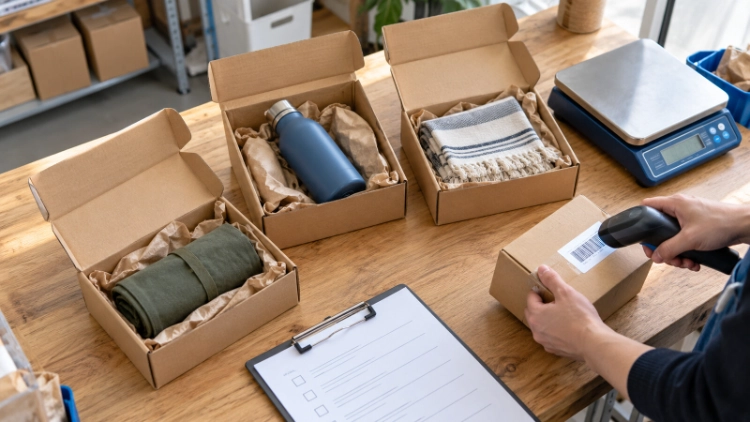
For each test, retain the order reference, received items, packing photos, tracking events and supplier charge. A tracking upload and a carrier acceptance scan are separate events. Recording both helps locate a delay between label creation and collection.
The decision to expand then has evidence behind it. Wrong items require a mapping or picking correction. Duplicate submissions require a routing correction. Increasing volume before resolving either problem simply exposes more orders to it.
Settle What Remains With the Old Provider
Unused packaging, stored goods and supplier balances need their own reconciliation after order routing changes. A shipment already in transit may still generate a delivery query or claim. Retaining its records and the responsible contact allows follow-up without returning new orders to the old workflow.
LZ Dropshipping provides its own ERP system for order processing, account top-ups and balance visibility, alongside dedicated customer communication groups. During a handover, the system balance and the outstanding supplier charges are separate figures to reconcile. The communication group provides a channel for resolving an order exception, with its order reference and required action attached.
Conclusão
To switch dropshipping suppliers without losing control of live orders, the handover record must agree with what each warehouse is actually doing. Product approval and app configuration matter, but neither settles responsibility for a parcel already being packed.
For a planned move, discuss your supplier handover with LZ using the product specification, open-order list and destination markets. Those documents give the sourcing and fulfillment teams a concrete starting point.
FAQ
Q1: Can I change suppliers without deleting my Shopify product pages?
A1: Often, yes, but the method depends on the app. A supported supplier remapping process can preserve the listing. Where the replacement product differs, its photos, specifications and variant options still need updating. The integration’s supported procedure determines whether a new import is necessary.
Q2: What happens to unfulfilled orders when I switch suppliers?
A2: They need individual allocation rather than an automatic transfer. Check each order against the old provider’s processing records. If fulfillment has already been accepted, cancellation needs that provider’s acceptance before the location changes. Shipped items stay associated with their original tracking and delivery follow-up.
Q3: Can I move only some products to a new supplier?
A3: Yes, where the integrations support separate product mappings and routing. Mixed carts deserve particular attention: items can travel from different providers in separate parcels. The test needs to show which provider handles each item and how the customer receives the associated tracking information.